
Guest post by the Silkee Solution Team
Managing emails and calendars can eat up hours of your day. The average professional spends 28% of their workday reading and responding to emails. That’s why more businesses are turning to a virtual assistant for email and calendar management to reclaim their time and boost productivity.
As a leading provider of virtual assistant services, we’ve helped hundreds of businesses transform their communication workflows. In this guide, we’re sharing our insights on how virtual assistants can revolutionize your email and calendar management.
What Is a Virtual Assistant for Email and Calendar Management?
A virtual assistant for email and calendar management is a remote professional who handles your inbox, schedules appointments, and keeps your day organized. These skilled professionals work from their own location and use digital tools to manage your communications and time effectively.
Think of them as your personal organizer who never takes a coffee break. They sort through emails, respond to routine messages, flag urgent items, and ensure your calendar runs smoothly without double bookings or missed meetings.
Why You Need Email and Calendar Management Services
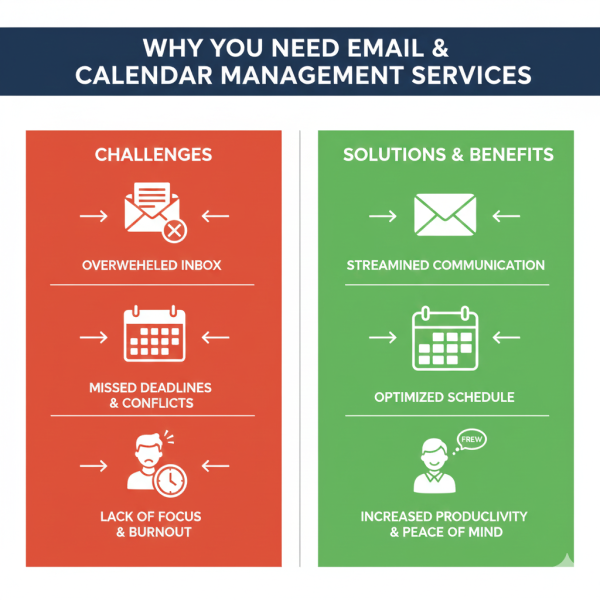
Your inbox shouldn’t control your day. Here’s why hiring help makes sense:
Time Savings: Most business owners waste 2-3 hours daily on email management. A virtual assistant gives you that time back to focus on growing your business or enjoying life.
Reduced Stress: Inbox zero becomes reality when someone else handles the flood of messages. You’ll sleep better knowing nothing important slips through the cracks.
Better Organization: Professional virtual assistants use proven systems to categorize emails, prioritize tasks, and maintain clean calendars. No more scrambling to find that important message from last week.
Increased Productivity: When you’re not constantly checking email, you can dive deep into meaningful work without interruptions.
Key Responsibilities of Virtual Assistants for Calendar Scheduling
A virtual assistant for calendar scheduling does much more than just book appointments. Here’s what they handle:
They coordinate meeting times across multiple time zones, send calendar invites with all necessary details, and reschedule appointments when conflicts arise. They also maintain your availability preferences, block time for focused work, and send meeting reminders to all participants.
Good calendar management means anticipating conflicts before they happen. Your assistant will review your schedule daily, ensure adequate travel time between appointments, and keep buffer time so you’re never rushing from one meeting to the next.
Essential Tasks Your Virtual Assistant for Inbox Management Handles
Professional virtual assistant for inbox management services transform chaotic inboxes into organized systems. Here’s how:
Email Sorting and Filtering: Your assistant creates folders and labels to automatically organize incoming messages. Important emails get flagged, spam gets deleted, and newsletters go into reading folders.
Response Management: Routine emails get handled immediately using templates you’ve approved. Your assistant drafts responses for complex emails that need your personal touch, saving you the time of starting from scratch.
Priority Identification: Not all emails deserve immediate attention. Your assistant identifies urgent messages, flags time-sensitive requests, and ensures VIP contacts always get quick responses.
Follow-up Tracking: Important emails that need follow-up get tracked in a system. Your assistant sends reminders and nudges people who haven’t responded to critical requests.
How to Hire a Virtual Assistant for Email Management
Finding the right person takes some thought. Follow these steps:
Start by listing exactly what you need help with. Do you need someone for 5 hours weekly or 30? What email platforms do they need to know? What level of decision-making authority will they have?
Look for candidates with proven experience in administrative support. Check reviews and ask for references. The best virtual assistants for email and calendar management have worked with multiple clients and can share success stories.
Test their skills with a paid trial period. Give them real tasks and see how they handle your inbox style. Good communication is essential since they’ll be representing you in written form.
At Silkee Solution, we carefully match businesses with experienced virtual assistants who specialize in email and calendar management. Our team undergoes thorough training in the latest productivity tools and best practices for inbox management, ensuring you get professionals who hit the ground running.
Best Virtual Assistant Services for Managing Calendars and Emails
When searching for the best virtual assistant for calendar and email coordination, consider these factors:
Platform Expertise: Your assistant should be fluent in tools like Google Workspace, Microsoft Outlook, Calendly, and scheduling apps. They should adapt to whatever system you use.
Communication Skills: Since they’re handling your correspondence, excellent writing skills are non-negotiable. They should match your communication style and tone.
Proactive Problem-Solving: The best assistants don’t just follow instructions. They spot potential issues, suggest improvements, and take initiative to make your life easier.
Reliability: You need someone who shows up consistently, meets deadlines, and communicates clearly if problems arise.
Our virtual assistants at Silkee Solution bring years of experience and receive ongoing training to stay current with the latest email management strategies and calendar optimization techniques. We’ve built our reputation on delivering reliable, professional support that truly makes a difference.
Tools and Software for Remote Email and Calendar Assistant
Modern virtual assistants use powerful tools to manage your time effectively:
Email Platforms: Gmail, Outlook, Yahoo Mail, and others all have advanced features your assistant will master. Filters, labels, templates, and automation rules turn email chaos into organized systems.
Calendar Applications: Google Calendar, Outlook Calendar, Apple Calendar, and Calendly integrate seamlessly to prevent scheduling disasters. Your assistant synchronizes everything so you see one unified schedule.
Task Management: Tools like Asana, Trello, or Todoist help your assistant track follow-ups, deadlines, and action items from emails.
Communication Tools: Slack, Microsoft Teams, or other messaging apps let you give quick instructions and stay connected with your assistant throughout the day.
A skilled virtual assistant for email and calendar management learns your preferred tools quickly and can suggest better alternatives if your current setup isn’t working well.
Benefits of Outsourcing Calendar and Email Tasks to a Virtual PA
Outsourcing these tasks to a virtual personal assistant for scheduling and email management delivers real results:
Cost Savings: Virtual assistants cost significantly less than hiring a full-time employee. You pay only for the hours you need without benefits, office space, or equipment costs.
Flexibility: Need more help during busy seasons? Scale up easily. Slower months? Scale back without awkward conversations or layoffs.
Access to Expertise: Virtual assistants often have more diverse experience than in-house staff because they’ve worked with multiple industries and business styles.
Focus on Core Business: When you’re not drowning in emails, you can focus on activities that actually grow your business. Sales, strategy, and customer relationships deserve your attention more than inbox management.
Work-Life Balance: Imagine finishing your workday without a nagging feeling about unread emails. Virtual assistants make that possible, giving you genuine time off.
How Virtual Assistants Help with Appointment Setting and Email Filtering
The combination of appointment setting and email filtering creates a smooth workflow. Here’s how it works:
When someone emails requesting a meeting, your assistant checks your calendar, finds suitable times, and responds with availability. Once a time is agreed upon, they send calendar invites, add relevant details, and brief you on who you’re meeting and why.
For email filtering, they create smart rules that automatically sort incoming messages. Client emails go to one folder, team updates to another, and newsletters to a reading folder you check weekly. Spam and irrelevant messages disappear before you ever see them.
This integrated approach means fewer interruptions. Instead of constant email notifications, you review batched summaries at times that work for you. Urgent matters still reach you immediately, but everything else waits until you’re ready to focus on communication.
Finding Affordable Virtual Assistant Solutions for Email and Scheduling
Budget-conscious businesses can still access quality help. Here’s how to find affordable virtual assistant for handling emails and appointments:
Hourly vs. Package Rates: Some assistants charge by the hour while others offer monthly packages. Packages often provide better value if you have consistent needs.
Offshore Options: Virtual assistants in countries with lower living costs can provide excellent service at reduced rates. Focus on English proficiency and communication skills rather than location.
Part-Time Support: You might not need 40 hours of help weekly. Start with 10-15 hours and increase as you see the value.
Specialized Providers: At Silkee Solution, we offer competitive rates because we specialize in these services. Our efficient training and processes mean your assistant becomes productive faster, delivering better value for your investment.
Don’t sacrifice quality for price alone. A cheap assistant who makes mistakes or needs constant supervision wastes more money than they save. Look for the best value, not just the lowest price.
Virtual Executive Assistant for Professional Email and Meeting Coordination
Senior professionals need a virtual executive assistant for email and meeting management who understands the higher stakes. Executive-level support includes:
Strategic Calendar Management: Your assistant doesn’t just book meetings. They ensure your schedule aligns with your priorities, protect time for strategic thinking, and decline or delegate requests that don’t deserve your attention.
Confidential Communication: Executive assistants handle sensitive information professionally. They know what can be shared and what stays private.
Stakeholder Management: They track relationships with key clients, partners, and team members. Important people get appropriate attention and follow-up.
Travel Coordination: When meetings require travel, your assistant books flights, hotels, and ground transportation while building in buffer time for delays.
Meeting Preparation: Before each appointment, you receive briefing documents with background information, talking points, and any materials you need.
We provide experienced virtual executive assistants at Silkee Solution who have supported C-level executives and business owners. They understand the nuances of high-level communication and the importance of discretion.
Top Skills to Look for When You Hire Someone to Manage Your Email and Calendar
The right virtual assistant brings these essential skills:
Attention to Detail: One missed zero in a meeting time or wrong date can create expensive problems. Your assistant must catch errors before they happen.
Time Management: They need to manage not just your time but theirs too. Meeting deadlines and juggling multiple priorities is part of the job.
Tech Savviness: New tools and platforms emerge constantly. Your assistant should learn quickly and suggest technologies that make workflows smoother.
Discretion: They’ll see confidential information. Trustworthiness isn’t optional.
Initiative: The best assistants don’t wait for instructions on obvious tasks. They anticipate needs and act accordingly.
Clear Communication: Whether writing emails on your behalf or updating you on action items, clarity prevents misunderstandings.
When interviewing candidates, ask for specific examples of how they’ve demonstrated these skills. At Silkee Solution, we pre-vet our virtual assistants for all these qualities, saving you the screening time.
Freelance Virtual Assistant vs. Agency for Email Management Support
Should you hire independently or use an agency? Both options have merit:
Freelance Virtual Assistants: Direct relationships often cost less and allow for personalized working relationships. However, if your assistant gets sick or goes on vacation, you’re on your own. Quality varies widely, and you handle all the vetting and training.
Agency Services: Companies like ours provide backup coverage, quality guarantees, and professional management. If an assistant isn’t working out, we replace them quickly. You pay slightly more but get reliability and support.
Hybrid Approach: Some businesses hire freelancers for routine tasks and keep an agency relationship for overflow work or backup coverage.
For business-critical functions like email and calendar management, the reliability of an agency often outweighs the cost savings of freelancing. When someone else manages your schedule, you need certainty they’ll be there.
Common Mistakes to Avoid When Working with a Virtual Calendar Manager
Even with great help, these mistakes can undermine your success:
Unclear Instructions: Your assistant can’t read your mind. Vague guidance leads to decisions you don’t like. Take time upfront to explain your preferences clearly.
Micromanaging: If you’re checking every email they sort and second-guessing every calendar decision, you’re defeating the purpose. Trust the process and adjust as needed.
No Communication Systems: Establish how you’ll communicate. Daily check-ins? Weekly summaries? A Slack channel for quick questions? Without clear channels, things fall through the cracks.
Ignoring Their Suggestions: Your assistant sees patterns in your schedule you might miss. When they suggest changes, listen. They might spot that you schedule too many meetings after lunch when you’re less sharp.
Failing to Update Them: Your priorities change and so should your email management strategy. Keep your assistant informed about new projects, shifting priorities, or relationship changes that affect how emails should be handled.
Working with a professional service like Silkee Solution helps avoid these pitfalls. We provide structured onboarding and regular check-ins to ensure everything runs smoothly.
How Online Assistants Improve Workflow with Email Triage and Calendar Optimization
Systematic email triage creates dramatic improvements:
The 4 D’s Method: Your assistant sorts emails into four categories—Do (urgent and important), Delegate (someone else should handle), Defer (important but not urgent), or Delete (not important). This simple system ensures nothing critical gets missed while clearing out clutter.
Calendar Batching: Similar meetings get grouped together. All client calls happen in specific blocks, internal meetings in others, and focused work time stays protected. This reduces context switching and improves productivity.
Template Libraries: For frequently sent emails, your assistant creates templates that maintain your voice while speeding up responses. Meeting confirmations, follow-ups, and routine inquiries get handled in minutes instead of hours.
Priority Protocols: You define what counts as urgent and your assistant enforces those rules. Not everything is an emergency despite what email senders think.
Online assistants for organizing your inbox and schedule apply these methods consistently. The result is a communication system that serves you instead of one you serve.
Real Results: What to Expect from Professional Calendar and Email Management
Realistic expectations help you measure success:
First Month: Your assistant learns your style, preferences, and common email types. Expect some back-and-forth as you refine processes. You should see immediate reduction in email time but optimization takes a few weeks.
Months 2-3: Systems are running smoothly. Your inbox stays under control and your calendar makes sense. You’re spending 50-70% less time on email and scheduling tasks.
Months 4+: Your assistant anticipates needs before you mention them. They’ve built relationships with frequent contacts and can handle increasingly complex decisions independently. You’re free to focus almost entirely on high-value activities.
Quantifiable Improvements: Most clients report saving 10-15 hours weekly, responding to important emails 60% faster, and missing fewer appointments or deadlines. These improvements directly impact business growth and personal wellbeing.
At Silkee Solution, we track these metrics with clients and provide regular reports showing the time and cost savings our virtual assistants deliver. This transparency helps you see the return on your investment.
Getting Started: Implementing Virtual Assistant Support for Your Email and Calendar Today
Ready to reclaim your time? Here’s your action plan:
Step 1: Audit Your Current Situation: Track how many hours you spend weekly on email and calendar management. What tasks are most time-consuming? What types of emails could someone else handle?
Step 2: Define Your Needs: Write down exactly what you want help with. Be specific about decision-making authority, working hours, and communication preferences.
Step 3: Choose Your Provider: Research options and interview candidates or agencies. We offer free consultations at Silkee Solution to discuss your needs and match you with the right assistant.
Step 4: Onboarding: Spend quality time training your assistant. Share email templates, explain your scheduling preferences, and introduce them to key contacts. This investment pays off quickly.
Step 5: Regular Review: Schedule monthly check-ins to discuss what’s working and what needs adjustment. Great partnerships evolve as your business grows.
Step 6: Expand Gradually: As you see results, consider expanding your assistant’s responsibilities. Many clients start with email and calendar management, then add travel booking, research, or other administrative tasks.
The sooner you start, the sooner you’ll wonder how you ever managed without this support. Your future self will thank you for making this decision today.
Frequently Asked Questions
What does a virtual assistant for email and calendar management cost?
Costs typically range from $15 to $50 per hour depending on experience level and location. Monthly packages often provide better value, ranging from $500 to $2,000 for 20-40 hours of support. At Silkee Solution, we offer competitive pricing with transparent packages tailored to different business needs.
How much time can I save by hiring a virtual assistant for inbox management?
Most professionals save 10-15 hours weekly when they delegate email and calendar tasks. This time savings translates to roughly 600 hours annually, equivalent to 15 full workweeks you can redirect toward business growth or personal priorities.
Can a remote assistant access my confidential emails safely?
Yes, when you work with reputable providers who use secure systems. Professional virtual assistants sign confidentiality agreements and use encrypted communication channels. At Silkee Solution, we thoroughly vet our assistants and implement security protocols to protect your sensitive information.
What email platforms do virtual assistants typically support?
Experienced virtual assistants work with all major platforms including Gmail, Microsoft Outlook, Yahoo Mail, Apple Mail, and business-specific systems. They adapt quickly to your preferred tools and can recommend better alternatives if your current setup has limitations.
How quickly can a virtual assistant start managing my calendar and emails?
Most virtual assistants can begin basic tasks within 2-3 days after onboarding. Full optimization typically takes 2-4 weeks as they learn your preferences and communication style. Our assistants at Silkee Solution often provide faster starts because they have standardized training in common business systems.
Do I need to provide software or tools for my virtual assistant?
Most virtual assistants use their own equipment and standard software. You’ll need to provide access to your email account and calendar through secure credential sharing. Specialized tools or premium software subscriptions are typically discussed during the hiring process.
What happens if my virtual assistant is sick or on vacation?
Freelance assistants may not provide backup coverage. At Silkee Solution, we provide backup assistants who can step in during absences, ensuring your email and calendar management continues without interruption.
Can a virtual assistant handle multiple email accounts for me?
Absolutely. Experienced assistants regularly manage multiple email addresses for clients including personal, business, and role-specific accounts. They create systems to monitor all inboxes and ensure consistent communication across every account.
How do I communicate preferences and changes to my virtual assistant?
Most successful partnerships use a combination of initial detailed documentation, regular check-in calls, and real-time communication via messaging platforms. Your assistant should ask clarifying questions and document your preferences for future reference.
About Silkee Solution: We’re a leading provider of virtual assistant services, specializing in email and calendar management for busy professionals and growing businesses. Our experienced team has helped hundreds of clients reclaim their time and boost productivity. To learn more about how we can support your business, visit our website or schedule a free consultation today.